Newsletter Subscribe
Enter your email address below and subscribe to our newsletter

Enter your email address below and subscribe to our newsletter

After an Android device is factory reset, the system may require verification of the Google account that was previously signed in. This security feature is known as FRP (Factory Reset Protection). With the release of Android 16, Google has further strengthened its FRP security mechanisms, making many previously popular bypass methods ineffective.
If you’ve forgotten your Google account credentials, purchased a second-hand device that wasn’t properly unlinked, or become locked out after resetting your phone, this guide will help you understand the latest changes to Android 16 FRP, explain why traditional Android 16 FRP bypass methods no longer work, and explore the solutions that are still available.
FRP (Factory Reset Protection) is an anti-theft security feature introduced by Google for Android devices.
When a device with a Google account enabled is factory reset, users must verify the previously associated Google account and password before the device can be activated again.
The primary purposes of FRP are to:
In Android 16, Google has significantly strengthened FRP protection.
Key changes include:
As a result, many older FRP bypass tutorials no longer work on Android 16 devices.
In the past, many users relied on hidden TalkBack accessibility shortcuts to access system settings and bypass the Google verification screen.
However, in Android 16:
As a result, this method is now largely ineffective.
Older Android versions allowed some users to access browsers, settings menus, or other system components through the Emergency Dialer or Google Assistant.
In Android 16:
Therefore, these methods are no longer viable for bypassing FRP.
Many traditional FRP bypass methods relied on installing third-party APK files to gain access to device settings.
Android 16 now places strict limitations on this approach:
Even if you obtain an FRP bypass APK, installing and using it is often impossible.
Some older tutorials exploited vulnerabilities within Android settings to bypass FRP verification.
Examples included:
Android 16 has patched these loopholes.
Even if users manage to access parts of the settings menu, they can no longer modify critical options that affect FRP status.
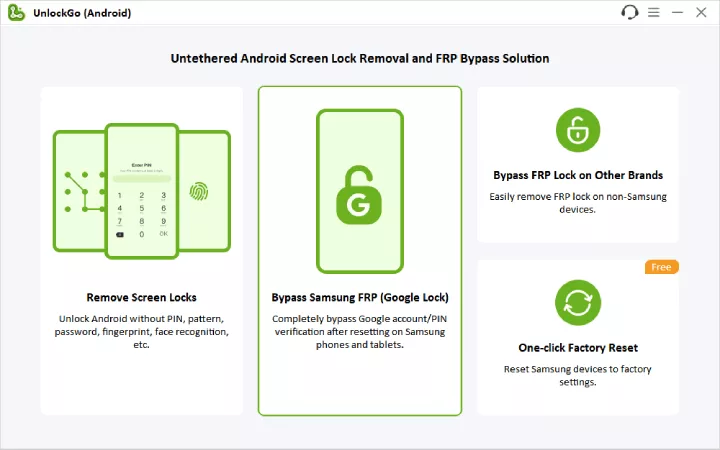
For users who can no longer recover their Google account credentials, a professional FRP unlock tool remains one of the most effective solutions available.
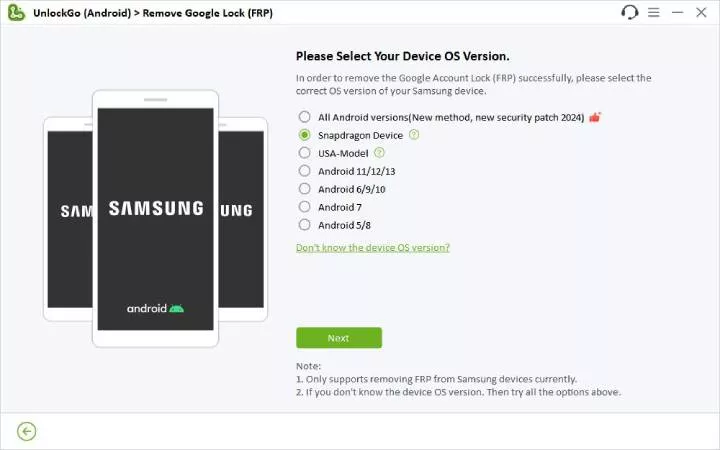
iToolab UnlockGo (Android) is a dedicated tool designed to remove Android screen locks and Google FRP locks.
Key features include:
Steps to bypass FRP with UnlockGo:

If you still have access to your Google account information, Google’s official account recovery process is the recommended solution.
Steps:
Keep in mind that after changing your password, Google may require a waiting period of 24 to 72 hours before the new credentials can be used to pass FRP verification.
If the device was legally purchased and you still have proof of ownership, you can contact the manufacturer’s official service center.
You may need to provide:
Official support can verify ownership and provide assistance with unlocking the device.
It depends on the device brand and the method used.
Official methods and tools like UnlockGo usually do not affect your warranty, but other third-party methods may depend on the manufacturer’s policy.
Yes. Android 16 features stronger FRP security, making it more difficult to bypass than previous Android versions.
When an Android device is factory reset, FRP requires you to verify the previously linked Google account before the device can be used again. This helps prevent unauthorized access to the device.
Android 16 significantly strengthens FRP security, making many previously effective bypass techniques obsolete and far less reliable than before, such as TalkBack exploits, Emergency Dialer tricks, FRP APK installations, and settings loopholes—largely ineffective.
For users who legally own their devices, a professional FRP unlock tool like iToolab UnlockGo (Android) can help remove Google FRP locks and restore access to the device.