Newsletter Subscribe
Enter your email address below and subscribe to our newsletter

Enter your email address below and subscribe to our newsletter

Google takes user security very seriously. To protect Android devices from unauthorized access, Google introduced a security feature called Factory Reset Protection (FRP).
When an Android device performs a factory reset, the system may require users to complete Google account verification before they can access the device again. This means users need to sign in with the previously synced Google account on the device.
If you are locked out by Google account verification and want to know how to bypass Google account verification after reset, this guide will introduce the possible methods to help you solve the issue.
Google Account Verification is part of Android’s Factory Reset Protection (FRP) security feature.
FRP is an Android security mechanism designed to protect your device and personal information. Once a Google account is added to an Android device, FRP is automatically activated.
After a factory reset, the device requires verification with the previously synced Google account. Without the correct Google account information, you may be unable to complete the device setup process.
Google verification usually appears in the following situations:
If you cannot access the previously synced Google account, using a professional FRP unlock tool can be an effective solution.
iToolab UnlockGo Android is designed to help users remove Google FRP lock from Android devices without requiring the original Google account credentials.
Launch iToolab UnlockGo Android on your Windows PC, then select “Bypass Samsung FRP” mode.
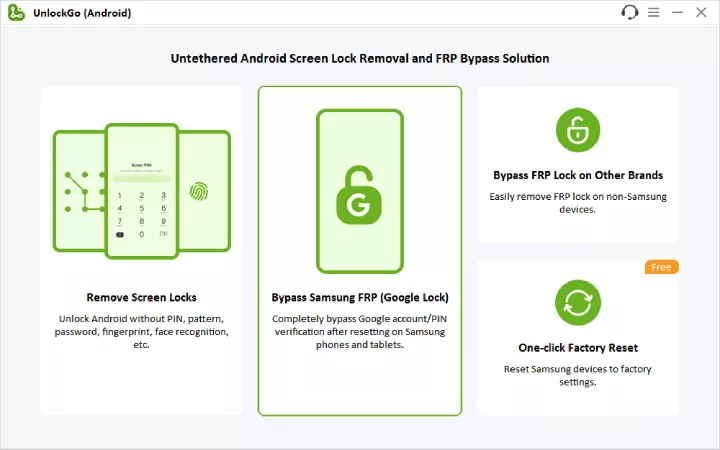
Connect your Android phone to the computer using a USB cable.
Choose your Android device brand and follow the on-screen instructions provided by UnlockGo Android.

Follow the instructions shown in the software.
The program will begin the FRP bypass process and remove the Google account verification lock.

After the process is completed, restart your device and complete the Android setup.

For users who do not want to use a computer, some manual FRP bypass methods may be available depending on the Android version and security patch.
One common method is using Google Keyboard settings to access certain device settings and bypass the verification screen.
However, this method can be relatively complicated and may not work on all Android devices.
Compared with manual methods, using a professional FRP bypass tool provides a simpler and more reliable solution.
To prevent being locked by Google verification after a factory reset, you should prepare your device before resetting it.
Before performing a factory reset, remove your Google account from the device. Follow these steps:
Settings → Accounts → Select Google Account → Remove Account
After removing the Google account, FRP protection will be disabled, and the device will not require previous Google account verification after reset.
Make sure you can still access your Google account before resetting your phone.
Yes. FRP bypass tools like iToolab UnlockGo Android can help you regain access when you forget your previous credentials,
No. Factory reset does not remove FRP. After reset, the device may still ask for the previously synced Google account.
Most FRP bypass methods focus on removing account verification, but users should always back up data when possible.
Conclusion
Google Account Verification and FRP Lock are important security features designed to protect Android devices. However, they can become a problem when users forget their credentials or perform a factory reset on the device.
If you are searching for how to bypass Google account verification after reset, you can try manual methods or use a professional FRP bypass tool like iToolab UnlockGo Android for a simpler solution.